
Summary
Keywords
Full Transcript
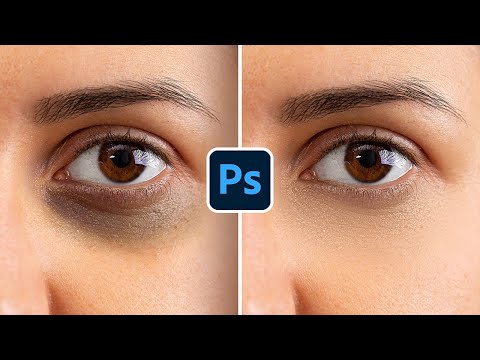
Photoshop Dark Circles Away with High-End Retouching! Discover two skin retouching techniques to beautifully remove unevenness, like eye bags or dark circles, while keeping the skin texture intact. In this tutorial, we will learn two variations of Frequency Separation to separate the texture and target the skin tones for a natural-looking result. I hope this video helps you. Thank you so much for watching :) ► TIMESTAMPS: 00:00 3 Ways to Fix Dark Circles 00:16 Why Regular Methods Won't Work 01:37 Method 1 06:14 Method 2 10:20 Quick Recap ► DOWNLOAD FREQUENCY SEPARATION ACTION: https://pix.live/fsaction ► CHECK OUT THE OFFICIAL PIXIMPERFECT COMPOSITING PLUGIN: https://pix.live/compositing ► SUPPORT THE CHANNEL & GAIN PREMIUM ACCESS: https://www.patreon.com/piximperfect ► RECOMMENDED SOFTWARE & CREATIVE RESOURCES: ✅ Official PiXimperfect Compositing Plugin: https://pix.live/pixcomposite ✅ The Best A.I. Powered High-End Portrait Retouching Plugins: https://pix.live/retouch4me ✅ Unlimited Photoshop Actions, Plugins, Brushes, Assets, etc: https://pix.live/envato ✅ The Best Professional Plugin for Color Grading: https://pix.live/infinitecolor ✅ The Best Professional Plugin for Skin Tones: https://pix.live/unify ✅ Best Plugin for Landscape & Astrophotography: https://pix.live/propanel ✅ Try Photoshop for Free: https://pix.live/photoshop ✅ The App I Use for YouTube Growth: https://pix.live/ytapp ✅ Music Used in PiXimperfect Videos: https://pix.live/music ► THE GEAR I USE: ✅ My Graphic Tablet: https://pix.live/wacompro ✅ Recommended Budget Tablet: https://pix.live/wacomlite ✅ Primary Microphone: https://pix.live/mic1 ✅ Budget Microphone: https://pix.live/mic2 ✅ Audio Interface: https://pix.live/audiointerface ✅ Camera: https://pix.live/camera ✅ Lens: https://pix.live/lens ► PIXIMPERFECT MERCH STORE: https://teespring.com/stores/piximperfect ► PIXIMPERFECT ACTIONS: https://gumroad.com/piximperfect ► SHARE: https://goo.gl/IUhnUl ► DOWNLOADS: 1. Sample Image: http://bit.ly/40H2zKf 2. Finished PSD: https://bit.ly/3ZivNxW (Only for PiXimperfect Patreon Family) ► LET'S CONNECT: Instagram: https://www.instagram.com/piximperfect Facebook: http://facebook.com/piximperfect Twitter: https://twitter.com/piximperfect

Continue this lesson in the app
Install CourseHive on Android or iOS to keep learning while you move.




