
Summary
Keywords
Full Transcript
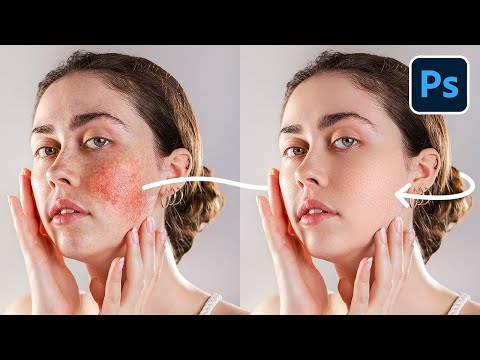
Discover one of the most powerful high-end skin retouching techniques in Photoshop to fix blotchy skin, discoloration, or unevenness. You can use this technique to not only fix any issues with the skin but also for high-quality skin softening or smoothing while keeping the texture intact. In this tutorial, we will start by using Frequency Separation to separate the image into color and texture and then use various advanced techniques to precisely target and repair blotchy and uneven skin. We will use methods such as the Patch Tool and Hue/Saturation, along with the help of Check Layers, to get the cleanest results. I hope this video helps you. Thank you so much for watching :) ► DOWNLOAD FREQUENCY SEPARATION ACTION: https://pix.live/fsaction ► SUPPORT THE CHANNEL & GAIN PREMIUM ACCESS: https://www.patreon.com/piximperfect ► RECOMMENDED SOFTWARE & CREATIVE RESOURCES: ✅ The Best A.I. Powered High-End Portrait Retouching Plugins: https://pix.live/retouch4me ✅ Unlimited Photoshop Actions, Plugins, Brushes, Assets, etc: https://pix.live/envato ✅ The Best Professional Plugin for Color Grading: https://pix.live/infinitecolor ✅ The Best Professional Plugin for Skin Tones: https://pix.live/unify ✅ Best Plugin for Landscape & Astrophotography: https://pix.live/propanel ✅ Try Photoshop for Free: https://pix.live/photoshop ✅ The App I Use for YouTube Growth: https://pix.live/ytapp ✅ Music Used in PiXimperfect Videos: https://pix.live/music ► THE GEAR I USE: ✅ My Graphic Tablet: https://pix.live/wacompro ✅ Recommended Budget Tablet: https://pix.live/wacomlite ✅ Primary Microphone: https://pix.live/mic1 ✅ Budget Microphone: https://pix.live/mic2 ✅ Audio Interface: https://pix.live/audiointerface ✅ Camera: https://pix.live/camera ✅ Lens: https://pix.live/lens ► PIXIMPERFECT MERCH STORE: https://teespring.com/stores/piximperfect ► PIXIMPERFECT ACTIONS: https://gumroad.com/piximperfect ► DOWNLOADS: 1. Sample Image: https://pix.live/blotchyskinsample 2. Finished PSD: https://bit.ly/3OPOPXJ (Only for our Patreon Family) ► SHARE: https://goo.gl/IUhnUl ► LET'S CONNECT: Instagram: https://www.instagram.com/piximperfect Facebook: http://facebook.com/piximperfect Twitter: https://twitter.com/piximperfect

Continue this lesson in the app
Install CourseHive on Android or iOS to keep learning while you move.





