
Summary
Keywords
Full Transcript
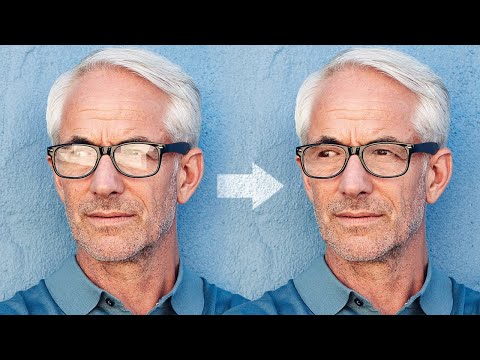
3 Simple Steps to Remove Complex Glare from Glasses in Photoshop! 🚀 Join PiXimperfect Pro - The Ultimate Photoshop Training Course: https://pix.live/pro Discover the best way to avoid and fix glare or reflections. Using advanced dodging and burning, in this tutorial, we will learn how to even out the brightness to make the glass completely transparent. Then, with the help of blending modes, we will remove any color cast and correct the skin tone around it. I hope this video helps you. Thank you so much for watching :) ► THE WACOM TABLET I USE: https://pix.live/wacom ► INFORMATION ON ALL WACOM TABLETS: Wacom's Website: http://bit.ly/pixwacominfo ► DOWNLOADS: 1. Sample Image: https://bit.ly/36Q8r8Y 2. Finished PSD: https://bit.ly/2TYNvHP (Only for our Patreon Family) ► LEARN MORE ABOUT CHECK LAYERS: https://youtu.be/fKc4VHY0vAI ► DISCUSSION ON GRAY LAYER FOR DODGING AND BURNING: https://youtu.be/ks_75Wzc5E8 ► SHARE: https://goo.gl/IUhnUl ►LET'S CONNECT: Facebook: http://facebook.com/piximperfect Twitter: https://twitter.com/piximperfect Instagram: https://www.instagram.com/piximperfect

Continue this lesson in the app
Install CourseHive on Android or iOS to keep learning while you move.





