
Summary
Full Transcript
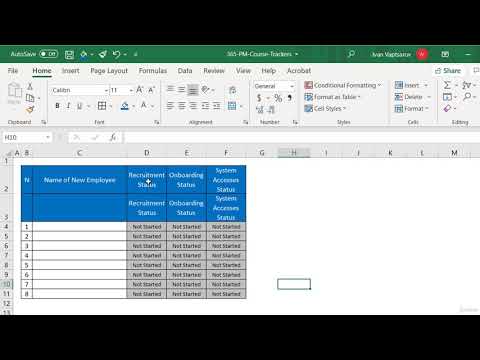
Project Management Course - Beginner to Project Manager Excel Project Tracker for Sequential Tasks | Monitor Recruitment, Onboarding & Access Workflow In this lesson, we built a powerful Excel tracker designed to monitor sequential project activities such as recruitment, onboarding, and system access. By structuring the process into clear steps with separate status columns, we ensured full visibility of each phase for every employee and made it easy to track progress without delays between tasks. We also improved readability through formatting techniques like merged headers, wrapped text, and standardized drop-down statuses, making the tracker both practical and easy to use in real project environments. The key takeaway is simple: when tasks follow a sequence, a structured tracker helps you maintain control, reduce waiting time between steps, and keep the entire process moving smoothly. This is exactly how project managers stay on top of complex, multi-step activities. With this, you now have another practical tool in your project management toolkit—ready to be adapted for any similar workflow in your own projects.

Continue this lesson in the app
Install CourseHive on Android or iOS to keep learning while you move.




