
Course Hive
Search

Welcome

Sign in or create your account

Continue with Google
or
Basic Excel Business Analytics #21: AVERAGE, MEDIAN, MODE.MULT functions & PivotTable Mode
Play lesson

Excel Business Analytics Free Course - Forecasting, Linear Programming, Simulation & more. - Basic Excel Business Analytics #21: AVERAGE, MEDIAN, MODE.MULT functions & PivotTable Mode

5.0 (1)
33 learners

What you'll learn

This course includes

  • 19.3 hours of video
  • Certificate of completion
  • Access on mobile and TV

Excel Business Analytics Free Course - Forecasting, Linear Programming, Simulation & more. Basic Excel Business Analytics #21: AVERAGE, MEDIAN, MODE.MULT functions & PivotTable Mode

Basic Excel Business Analytics #21: AVERAGE, MEDIAN, MODE.MULT functions & PivotTable Mode Transcript and Lesson Notes

Download files: https://people.highline.edu/mgirvin/AllClasses/348/348/AllFilesBI348Analytics.htm Review the reasons why have three average calculations: 1) (00:11) Mean, Median, Mode = Average = One number that represen

Quick Summary

Download files: https://people.highline.edu/mgirvin/AllClasses/348/348/AllFilesBI348Analytics.htm Review the reasons why have three average calculations: 1) (00:11) Mean, Median, Mode = Average = One number that represen

Key Takeaways

  • Review the core idea: Download files: https://people.highline.edu/mgirvin/AllClasses/348/348/AllFilesBI348Analytics.htm Review the reasons why have three average calculations: 1) (00:11) Mean, Median, Mode = Average = One number that represen
  • Understand how Excel fits into Basic Excel Business Analytics #21: AVERAGE, MEDIAN, MODE.MULT functions & PivotTable Mode.
  • Understand how Microsoft Excel fits into Basic Excel Business Analytics #21: AVERAGE, MEDIAN, MODE.MULT functions & PivotTable Mode.
  • Understand how Highline College fits into Basic Excel Business Analytics #21: AVERAGE, MEDIAN, MODE.MULT functions & PivotTable Mode.
  • Understand how Mike Girvin fits into Basic Excel Business Analytics #21: AVERAGE, MEDIAN, MODE.MULT functions & PivotTable Mode.

Key Concepts

Full Transcript

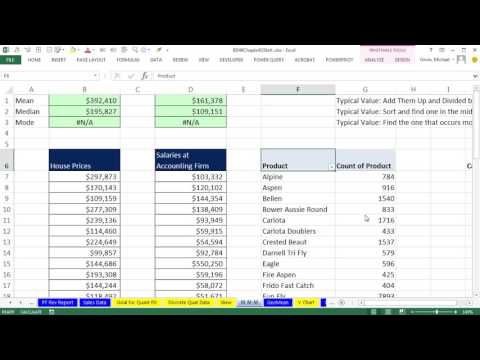
Download files: https://people.highline.edu/mgirvin/AllClasses/348/348/AllFilesBI348Analytics.htm Review the reasons why have three average calculations: 1) (00:11) Mean, Median, Mode = Average = One number that represents all the data points = A measure of central tendency. 2) (00:40) Mean to get a typical value. Add them up, Divide by the count. Use AVERAGE function. 3) (01:26) Median to get a typical value. The middle value in a sorted list. Median is the calculations to make if there are extreme values. Use MEDIAN Function. 4) (03:01) Mode to get a typical value for quantitative or categorical data. Finds the item that occurs most frequently. MODE.SNGL is for number data (quantitative data) and will find the mode when there is a single mode. 5) (04:18) If distribution is symmetrical Mean = Median = Mode. 6) (04:31) PivotTable and Sort feature to find the Mode for Categorical Data. 7) (06:29) MODE.MULT Array Function for number data (quantitative data) when there are multiple modes. This is an Array Function that requires the special key stroke: Ctrl + Shift + Enter. See Two Examples. Download Excel File Not: After clicking on link, Use Ctrl + F (Find) and search for “Highline BI 348 Class” or for the file name as seen at the beginning of the video.

Lesson FAQs

What is Basic Excel Business Analytics #21: AVERAGE, MEDIAN, MODE.MULT functions & PivotTable Mode about?

Download files: https://people.highline.edu/mgirvin/AllClasses/348/348/AllFilesBI348Analytics.htm Review the reasons why have three average calculations: 1) (00:11) Mean, Median, Mode = Average = One number that represen

What key concepts are covered in this lesson?

The lesson covers Excel, Microsoft Excel, Highline College, Mike Girvin, excelisfun.

What should I learn before Basic Excel Business Analytics #21: AVERAGE, MEDIAN, MODE.MULT functions & PivotTable Mode?

Review the previous lessons in Excel Business Analytics Free Course - Forecasting, Linear Programming, Simulation & more., then use the transcript and key concepts on this page to fill any gaps.

How can I practice after this lesson?

Practice by applying the main concepts: Excel, Microsoft Excel, Highline College, Mike Girvin.

Does this lesson include a transcript?

Yes. The full transcript is visible on this page in indexable HTML sections.

Is this lesson free?

Yes. CourseHive lessons and courses are available to learn online for free.

Continue Learning

Course Hive

Continue this lesson in the app

Install CourseHive on Android or iOS to keep learning while you move.

Related Lessons

Related Courses

FAQs

Course Hive
Download CourseHive and keep learning anywhere
Get App

