
Summary
Keywords
Full Transcript
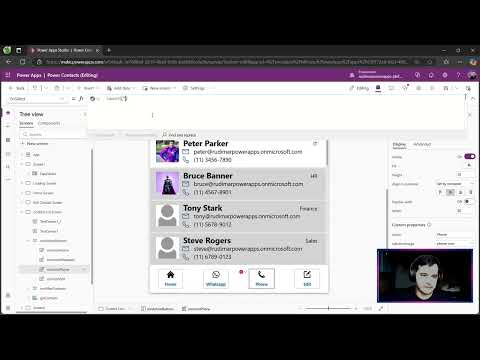
Opening Phone Numbers from Your Custom App: Final Steps In this episode, we complete the final action of our custom app by demonstrating how to open phone numbers directly in the phone app from your smartphone. This process includes using a simplified launch function and a formula to concatenate and sanitize phone numbers. Watch to see the step-by-step process and a successful test of the app. Stay tuned for the next module where we'll enhance our app with more features and knowledge. 00:00 Introduction to Final Action 00:25 Writing the Launch Formula 01:11 Testing the App 01:49 Final Thoughts and Next Steps Unlock Exclusive Perks by Joining Our Channel! Become a member today and gain access to exclusive content, behind-the-scenes insights, and members-only perks. 🦾 Click the link to join: https://www.youtube.com/channel/UCibsGGnYq_TlpyvteS1mnYQ/join 📺 Check out the course with life-time access: https://www.udemy.com/course/power-apps-learn-to-build-an-app-to-manage-your-inventory/?referralCode=394D1C18B17843401D9C #PowerApps #MicrosoftPowerApps #LowCodeDevelopment #AppBuilding #BusinessApps Keywords: power apps,tutorial,low code,sharepoint,learn power apps,microsoft,power apps for begginers, how to start with power apps canvas app, create an app connected to sharepoint, excel, app connected to excel

Continue this lesson in the app
Install CourseHive on Android or iOS to keep learning while you move.





