Summary
Keywords
Full Transcript
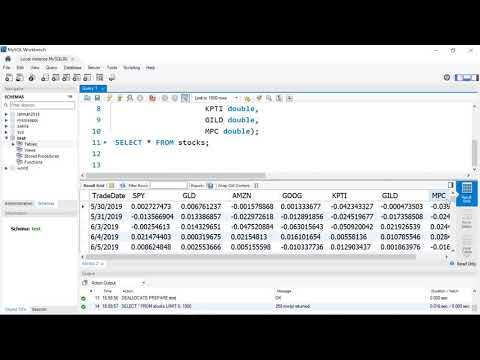
@MattMacarty #mysql #mysql_workbench #sqltutorial #dataengineering **Guide to getting your data from a CSV or Excel file directly into a MySQL database using MySQL Workbench!** This step-by-step tutorial covers the entire workflow: from creating your database (schema) to defining table structures and using the **Table Data Import Wizard** to load stock data in minutes. Learn how to make databases, table and addd data in MySQL Workbench Learn the basic workflow -- create -- import -- view data Learn how to use mysql workbench to bulk import csv formatted data You will learn both the traditional **SQL syntax** and the quick **Wizard method** for data import, ensuring you master data setup and cleaning. ### 🛠️ **Key MySQL Skills You Will Master:** * **Database Creation:** Use the `CREATE DATABASE` and `USE` commands. * **Table Definition:** Define tables and specify data types (VARCHAR, DOUBLE) using `CREATE TABLE` syntax [0:02:26]. * **Importing Data:** Use the Table Data Import Wizard to load CSV files quickly [0:06:54]. * **Data Type Conversion:** Learn how to fix common import errors, specifically transforming date strings into proper MySQL Date format using the `STR_TO_DATE` function [0:10:21]. * **Schema Cleanup:** Use the `ALTER TABLE` command to modify column names and data types after import [0:13:41]. --- ### ⏱️ Video Chapters / Timestamps 0:00 - Introduction to the Database Creation Workflow 0:32 - **Connecting to MySQL Server in Workbench** 1:05 - Creating a New Database (Schema) using `CREATE DATABASE` 1:46 - Deleting a Database using the `DROP DATABASE` command 2:10 - Using the `USE` command to activate a database 2:21 - **Method 1: Creating a Table using SQL Syntax** 3:04 - Reviewing the source CSV data file 3:59 - Defining column names and data types (VARCHAR vs. DATE) 5:50 - Checking the empty table with `SELECT * FROM table` 6:54 - **Method 2: Importing Data using the Wizard** 7:39 - Selecting the target table for import 8:15 - Executing the import and checking for record counts 9:19 - Viewing the imported data (as strings) 10:21 - **Data Cleaning: Transforming Strings to Date Format** using `STR_TO_DATE` 11:43 - **Method 3: Creating a NEW Table via the Import Wizard** 12:10 - Allowing the Wizard to define the column types (and fixing the date issue) 13:41 - **Fixing the Date/Time Issue** using the `ALTER TABLE` command 14:48 - Final check of the cleaned data --- ### 🔗 Resources * **Data File (data.csv):** [https://github.com/mjmacarty/mysql.git](https://github.com/mjmacarty/mysql.git) * **MySQL Workbench Download:** [https://alphabench.com/data/mysql-create-database.html](https://alphabench.com/data/mysql-create-database.html)

Continue this lesson in the app
Install CourseHive on Android or iOS to keep learning while you move.