
Summary
Keywords
Full Transcript
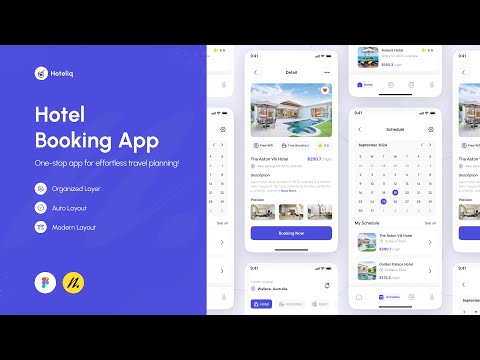
Let's learn how to design a Hotel Booking App in Figma for the UI Speed Design weekly challenge, week - 27. This video collaborates with Eagle Desktop, the best tool for organizing your reference. 🔥 Make your workflow faster : Eagle App - Organize all your reference images in one place - Website: https://bit.ly/3cEBdkv - Extension: https://bit.ly/3cvWpcx - Twitter: https://twitter.com/eagle_app - Instagram: https://www.instagram.com/eagle.app - Facebook: https://www.facebook.com/eagleapp Don't forget to subscribe to our channel for more UI Design Content. Click here 👉 https://bit.ly/namdesign Don't forget to leave a comment, hit the subscribe button, and show some love with a 💜💜! Stay tuned for our new video every Thursday. 🔗 OUR SERVICES Want a custom App for your brand? send me an email 👉 [email protected] 🔗 TOOLS WE UTILIZED Uxcel 👉 Learn UI/UX Design https://uxcel.com/?ref=namdesign 🔗 OUR LOVELY PRODUCT Web Design Bundle 👉 https://bit.ly/LandkitUI Ultimate UI Mockup Presentation Kit 👉 https://bit.ly/MockitUIPresentation 🔗 DOWNLOAD RESOURCES 》Build alongside by downloading the Figma file from this video: https://bit.ly/3BCdnlL 📽️ CHAPTERS 0:00 - Intro 0:05 - Review Eagle Desktop App 2:35 - Preview UI Design 2:44 - UI Assets 3:20 - Home Screen 34:03 - Detail Screen 49:43 - Schedule Screen ⬇ If you're interested in more Figma Tutorials, we'd love to hear from you in the comments ⬇ 💁♂️ SUPPORT US 》Buy us a cup of Coffee: https://buymeacoffee.com/namdesign 🎨 OUR FREE & PREMIUM RESOURCES 》Figma Community: https://www.figma.com/@itsmebfg 》Gumroad: https://namdesign.gumroad.com 🤳 Find us on SOCIAL MEDIA 》Instagram: https://www.instagram.com/newagemood 》Dribbble: https://dribbble.com/itsmebfg 》Pinterest: https://pinterest.com/newagemood 》NAM Design Page: https://facebook.com/newagemood –––– ⚠️ IMPORTANT ––––––– Like & Share if you enjoy the video! Subscribe to stay up to date with upcoming video tutorials, design inspiration, UI Design, UI/UX Design, Figma, Adobe Illustrator, Adobe XD & Design Graphic. Note: If you have any issues with this content, please report it to [email protected] and I will remove the content as soon as possible. DISCLAIMER: Just a quick reminder, some of the links in this description may be affiliate links. If you decide to purchase a product or service through these links, I may receive a small commission. Your support is greatly appreciated and it helps me to keep producing high-quality content for you every week! Thank you! –––– #UIDesign #UIUXDesign #UITrends2022 #UIDesignLearning #AppDesign

Continue this lesson in the app
Install CourseHive on Android or iOS to keep learning while you move.





