
Summary
Keywords
Full Transcript
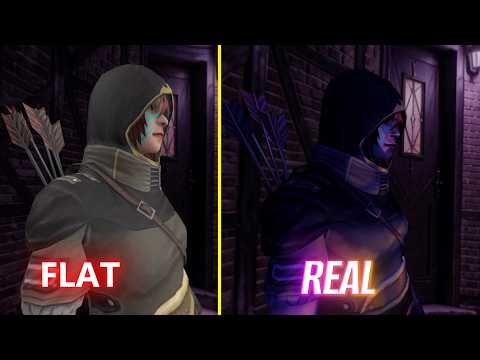
In this video editing tutorial, I’ll show you how to create realistic lighting for your 3D models like a Pro Vfx artist. I’m also going to be showing you how to get "Blender-level" realism using nothing but the MatCap trick in Node Video. This workflow mimics professional ray-tracing and cinematic lighting techniques If you want your 3d modeling on phone to stop looking like a mobile app and start looking like a cinematic render, this is the masterclass you’ve been waiting for. Inside this Masterclass: You’ll learn how to set up skybox lighting, adjust material settings, and control reflections to make your 3D models look more natural and cinematic. I’ll also break down how to use keyframe animation to create a realistic lighting reveal effect step by step. This is a practical breakdown you can use for motion graphics, VFX edits, and 3D compositing directly on mobile. If you’re trying to improve the realism of your 3D renders, this technique will help you a lot. 👍 If you enjoyed this tutorial, consider subscribing for more VFX and 3D editing breakdowns. #nodevideo #3dmodeling #blender #3dlighting #cgi #vfx #videoediting #3danimation #vfxnigerian

Continue this lesson in the app
Install CourseHive on Android or iOS to keep learning while you move.




