
Summary
Keywords
Full Transcript
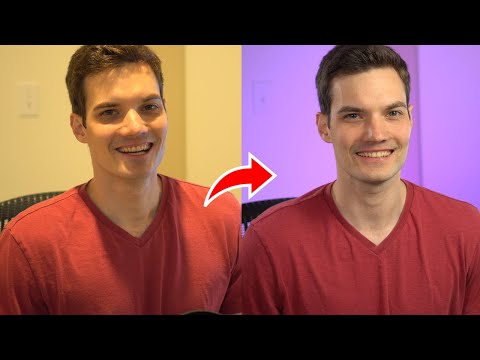
In this step-by-step tutorial, learn how you can better light your YouTube videos using an LED light. Lights provided by GVM and no compensation provided. Let me know what you think about the outcome! 👋 Additional resources: - Light featured in this video: GVM 50RS RGB LED Lights Panel - Official GVM Website: https://bit.ly/34Xbo8P - B&H Photo: https://bhpho.to/31MrNeu ⌚ Timestamps 0:00 Before 0:14 After 0:52 Lighting kits on B&H 1:28 What's wrong with lights at home 3:10 What comes with a kit 3:58 Lighting tips 4:38 Bicolor 5:10 Set colors 5:51 Lighting scenes 6:14 Wrap up 📃 Watch related playlists and videos - YouTube: https://www.youtube.com/playlist?list=PLlKpQrBME6xKCAJlzTSWm7I20cJcNzCCC 🚩 Connect with me on social: - LinkedIn: https://www.linkedin.com/in/kevinstratvert/ - Twitter: https://twitter.com/kevstrat - Facebook: https://www.facebook.com/Kevin-Stratvert-101912218227818 🔔 Subscribe to my YouTube channel https://www.youtube.com/user/kevlers?sub_confirmation=1 🎬 Want to watch again? Navigate back to my YouTube channel quickly http://www.kevinstratvert.com

Continue this lesson in the app
Install CourseHive on Android or iOS to keep learning while you move.


