
Summary
Keywords
Full Transcript
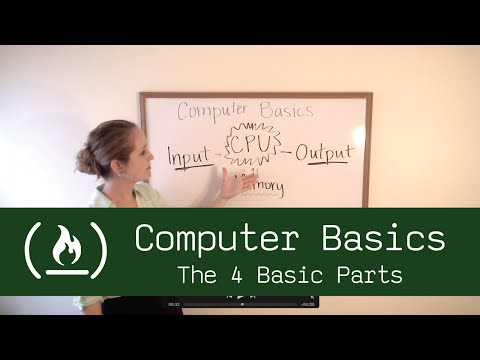
http://FreeCodeCamp.com is a community of busy people who learn to code, then practice by building projects for nonprofits. Learn Full-stack JavaScript, build a portfolio, and get great references with our open source community. Follow us on twitter: https://twitter.com/intent/user?screen_name=freecodecamp Follow us on Twitch: twitch.tv/freecodecamp Like us on Facebook: https://www.facebook.com/freecodecamp Follow Quincy on Quora: http://www.quora.com/Quincy-Larson At the very least, a machine needs these four basic parts to be considered a computer. Today we're going to talk about the basics of computer hardware. Computers are made up of 4 basic parts: the input, output, CPU, and memory. The input is what you're putting into the computer. Think about mouse, keyboard, microphone, any way you're getting data into the computer. The output is what you're watching on your monitor or listening to on your speakers. These can both be any format like text, numbers, videos, images, what have you, it doesn't matter. CPU stands for central processing unit, and that's what we all think of when we think of a computer. It's what does the functions, it's what runs the software, it manipulates the data. The memory is where we store data and information. Now, the CPU has exclusive access to this memory. You can't get to the memory from the input or the output without the use of the CPU. So, just to review, we've got 4 basic parts of the computer: the input, the output, CPU, and memory. ❤️ Support for this channel comes from our friends at Scrimba – the coding platform that's reinvented interactive learning: https://scrimba.com/freecodecamp

Continue this lesson in the app
Install CourseHive on Android or iOS to keep learning while you move.





