
Summary
Keywords
Full Transcript
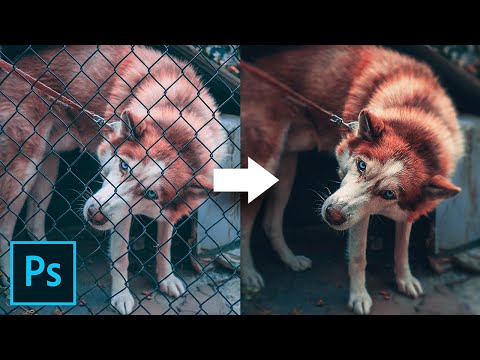
🚀 Join PiXimperfect Pro - The Ultimate Photoshop Training Course: https://pix.live/pro ► RECOMMENDED SOFTWARE & GEAR: ✅ My Graphic Tablet: https://pix.live/wacom ✅ Recommended Budget Tablet: https://pix.live/wacomlite ✅ Try Photoshop for Free: https://pix.live/photoshop ✅ Artificial Intelligence Photo Editor: https://pix.live/luminarai ✅ Unlimited Photoshop Actions, Plugins, and Stock Photos: https://pix.live/envato ✅ Primary Microphone: https://pix.live/mic1 ✅ Second Microphone: https://pix.live/mic2 ✅ Audio Interface: https://pix.live/audiointerface ✅ Filmed with: https://pix.live/camera ✅ Lens: https://pix.live/lens ✅ Music: https://pix.live/music ✅ The App I Use for YouTube Growth: https://pix.live/ytapp ► DOWNLOADS: 1. Sample Image: http://bit.ly/3SCPlvh 2. Finished PSD: http://bit.ly/39WFGsG (Only for our Patreon Family) Fences Obstructing Your Shot? Easily Remove Fence by Using 3 Simple Steps in Photoshop! Learn a simple but extremely powerful shortcut to easily brush off the fence with straight lines. In this tutorial, we will utilize the power of Photoshop's latest Content-Aware fill feature to remove distractions after creating a selection easily with brushes. I hope this tutorial helps you. Thank you so much for watching :) ► RECOMMENDED VIDEOS ON CONTENT-AWARE FILL: https://www.youtube.com/watch?v=LS4PehBbk5o https://youtu.be/ZIXM37H0mzs?t=555 ► LET'S CONNECT: Instagram: https://www.instagram.com/piximperfect Facebook: http://facebook.com/piximperfect Twitter: https://twitter.com/piximperfect

Continue this lesson in the app
Install CourseHive on Android or iOS to keep learning while you move.




