Summary
Keywords
Full Transcript
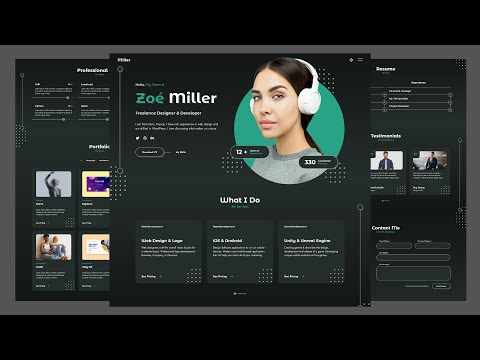
Portfolio Website - Create a Responsive Personal Portfolio Website Using HTML CSS & JavaScript ❤️ Get source code https://buymeacoffee.com/crypticacoder/e/371326 💙 Get source code by PayPal https://www.patreon.com/CrypticalCoder/shop/portfolio-website-zoe-miller-1313293?utm_medium=clipboard_copy&utm_source=copyLink&utm_campaign=productshare_creator&utm_content=join_link 📂 Assets https://drive.google.com/file/d/1CCMXEsKNhVKjCMDSKrsNPvHN0S7BmWM4/view?usp=drive_link Welcome to this step-by-step tutorial on creating a fully responsive personal portfolio website using HTML, CSS, and JavaScript. Whether you're a beginner or an experienced developer, this video will guide you through the process of designing a modern and interactive portfolio to showcase your work. 🎯 Perfect for: 🔹 Beginners looking to build their first portfolio website 🔹 Web developers who want to level up their skills 🔹 Anyone who wants a professional online presence 🔥 By the end of this tutorial, you’ll have a fully functional portfolio website that you can customize and use to impress clients or employers! You might like these: Responsive Fitness/Gym Website with HTML CSS and JavaScript ➤ https://youtu.be/DAuNRzH6sjs Responsive 3D Animated Website with HTML, CSS, and JavaScript ➤ https://youtu.be/p6KbkRYp-1o 📌 Chapters: 00:00:00 Intro (Project Overview) 00:07:49 Folder Structure / Project Setup 00:23:24 Main Section 00:23:43 Home Section 01:04:30 Services Section 01:35:10 Header Section 01:55:38 Sections Decoration 02:05:37 Change Header Background 02:08:53 Skills Section 💬 Have questions? Drop a comment below, and I’ll be happy to help! 📢 Don't forget to Like, Share & Subscribe for more web development tutorials! 🚀 #portfoliowebsite #responsivewebsite #htmlcssjavascriptproject #htmlcsswebsite

Continue this lesson in the app
Install CourseHive on Android or iOS to keep learning while you move.