
Summary
Keywords
Full Transcript
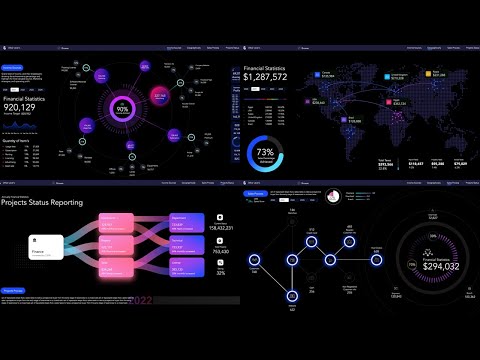
https://other-levels.com/products/one-time-full-access 🌍 🏅 The #1 Website Worldwide for Excel Dashboard Templates, Reports, and Professional Analysis Tools. 🎖️ 🏆 Other Levels YouTube Channel — The #1 Authority for Excel Dashboards on YouTube, with over 24 million views and a global impact. 💼 Other Levels Services * Custom Excel Dashboard Service https://other-levels.com/products/custom-excel-dashboard-service * Enhance Your Templates Service https://other-levels.com/products/enhance-your-templates-service 🎓 Master Excel Dashboards Join over 100,000 learners in our top-rated online course and gain the skills to create professional Excel dashboards from scratch. 👉 Enroll today: https://other-levels.com/products/master-microsoft-excel-dashboards-online-course To watch the full Tutorials? Join our channel Membership https://www.youtube.com/channel/UCuDF09RGFE3V3lY77Z_cA9g/join 🎓 Free Excel Courses On YouTube: Single Dynamic Excel Dashboard https://www.youtube.com/playlist?list=PLxuBYEpUjhDsVA2O1FTayFiYrDfoErdbx Multiple Dynamic Excel Dashboards https://www.youtube.com/playlist?list=PLxuBYEpUjhDuAfwWMEgnYirso6UXMzPB9 Have a question about this template? 👇🏻Comment down below Let’s connect on social LinkedIn https://www.linkedin.com/company/other-levels-com Facebook https://www.facebook.com/Other.levels.Official Instagram https://www.instagram.com/other.levels TikTok https://www.tiktok.com/@other.levels Playlists Data Analysis By Power Point https://youtube.com/watch PowerPoint Slides https://youtube.com/watch CV/Resume Templates https://youtube.com/watch Organizational Structure Chart https://www.youtube.com/watch PowerPoint Templates https://youtube.com/watch PowerPoint Dashboard https://youtube.com/watch Modern Excel Reports https://youtube.com/watch ⭐️ Is this really Excel? Yes, and it's powerful! Discover the Financial Statistics Dashboards System—the most-viewed Excel dashboard tutorial on YouTube with over 6 million views, brought to you by Other Levels. This dynamic Excel dashboard simplifies complex financial data into beautiful, interactive visuals. It’s perfect for business owners, analysts, and financial planners who want clear insights into income, sales, marketing ROI, and profits. 🚀 Here’s what you’ll learn in Tutorial 1: * Dynamic web chart to break down income by source * Stunning doughnut chart to track goal achievement * Monthly income line chart and average tracking * Total income, target values, and performance indicators * Operating profit breakdown by month * Compare marketing strategy effectiveness * All fully dynamic with yearly slicer filtering Plus, you’ll get: * Total profits by country via interactive map chart * Visual sales process diagram with customer flow * KPIs for project workflows in a stylish, editable layout * Fully editable in Excel – no macros or VBA required 💬 Got questions? Drop a comment below and we’ll help you out! 🔔 Subscribe for more Excel dashboard magic. 00:00 Is This Microsoft Excel?! Financial Statistics Dashboards System 00:36 Overview of Dashboards other-levels.com 01:04 Income Source Analysis with Web Chart and Doughnut Chart 01:15 Monthly Income Line Chart and Operating Profit Bar Chart 01:32 Yearly Slicer Controls Dashboard Interactivity 01:37 Map Chart for Country-Wise Profit Analysis 01:52 Tax Breakdown and Profit Percentage Doughnut Chart 02:00 Sales Process Status and Stage Funnel Chart 02:21 Sales Target vs Achieved and Refund Rate 02:32 Projects Workflow KPI Dashboard Overview 03:03 Start Dashboard Design with Income Source Sheet 05:02 Add Browser Button and Dashboard Navigation 06:23 Indicate Active Dashboard with Blue Tick 08:21 Copy Header Layout to All Dashboard Sheets 10:02 Create Pivot Table for Income Sources and Amounts 11:22 Design Custom Web Chart with Scatter Bubbles 13:11 Highlight Top Income Source with MAX Formula 14:43 Insert Year Slicer to Test Interactive Chart 16:04 Add Data Labels and Customize Circle Sizes 21:22 Calculate Achieved Percentage vs Target 24:14 Build Monthly Income Line and Area Charts 26:44 Extract Item Quantities and Percentages 27:40 Apply VLOOKUP to Display Detailed Metrics 31:21 Use Symbol Bullets Instead of Shapes 32:20 Display Average Monthly Income 34:42 Add Operating Expenses and Monthly Bar Chart 38:03 Marketing Strategy Profit Analysis B2B B2C 42:23 Build Distinctive Doughnut Chart for Target Progress 44:49 Complete Web Chart Center Design and Highlights 48:51 Breakdown Analysis for Each Income Source 50:42 Use Pivot Tables and VLOOKUP for Source Details 53:27 Duplicate Groups for Clean Layout 56:03 Distribute Source Circles and Final Web Layout 57:33 Finalize Web Chart with Icons and Labels 1:13:10 Finish First Dashboard and Apply Protection 1:14:02 Use Sheet Protection for Slicer and Dashboard #ExcelDashboard #FinancialDashboard #IncomeTracker #ExcelTutorial #BusinessAnalytics #DataVisualization #OtherLevels #ExcelTips #FinanceTool #MarketingAnalytics

Continue this lesson in the app
Install CourseHive on Android or iOS to keep learning while you move.



![Curso de Excel para contadores y financistas [Gratis y certificado] - Edutin Academy](https://i.ytimg.com/vi/rSACuW4WLqg/hqdefault.jpg)

