
Summary
Keywords
Full Transcript
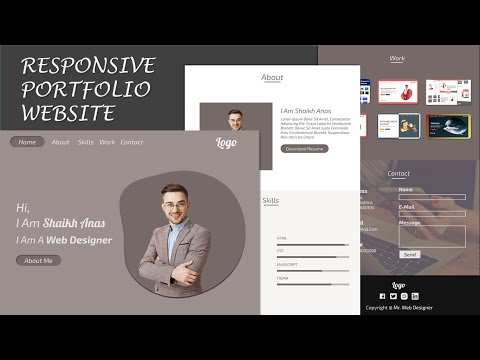
how to make complete responsive personal portfolio website design using html, css ( sass ) and javascript/jquery. mobile first responsive personal portfolio website tutorial for beginners step by step. simple complete responsive personal portfolio website design tutorial with source code. the main features of this website are: responsive navigation bar with menu icon toggle effect. responsive about section. responsive home section. responsive skill section responsive work section responsive contact section and simple footer section * SOURCE CODES * download full website code from google drive: https://drive.google.com/drive/folders/1PgOWFwe39ZkbdSvVchDGRPHuACmo3lfT?usp=sharing download main pic image from here: https://www.freepik.com/free-photo/handsome-businessman-suit-glasses-cross-arms-chest-look_9903076.htm#page=1&query=handsome-businessman-suit-glasses-cross-arms-chest-look&position=0 fonts i used was exo 2 and lobster from google fonts: https://fonts.google.com/specimen/Exo+2?query=exo+2 https://fonts.google.com/specimen/Lobster?query=lobster And Shape Images are Made Using Figma: Figma Is Free To Use: https://www.figma.com/downloads/ watch the full playlist of how to create responsive websites: https://www.youtube.com/playlist?list=PLSJxovi1IyDFf36uSXsfQTmTVVFjAEkuo New To My Channel Subscribe Now And See More Stuff Like This: https://youtube.com/channel/UCKwgH3vASrD2brd1l2m6NHw timestamp: 0:00 demo 3:10 header section/navbar section 11:20 home section 17:25 about section 22:05 skill section 28:40 work section 33:25 contact section 40:50 footer section #PersonalPortfolio #ResponsiveWebsite #WebDesign #CompleteWesbite #ResponsiveDesigns #animatedWebsite #HTML5 #CSS3 #SASS #SCSS #JQUERY #Javascript #WebDevelopment #WebsiteDesign

Continue this lesson in the app
Install CourseHive on Android or iOS to keep learning while you move.




